Implementation
This section discusses the key mechanical and electrical components of the build, as well as the software used to drive the VCA. Note that the same electronics and software used to control the vibrating spatula is used to control the vibrating surface in the transmission design here.
Mechanical
The full CAD (zipped .step file) can be downloaded by clicking here. The design was created in OnShape, and if the .step file is imported to OnShape a part studio should automatically be created. An interactive visualization of the CAD is provided below.
The single actuator is a LA18-18-000A voice coil actuator (VCA) that consists of a fixed permanent magnet assembly and a moving coil. The moving coil is attached—using 3D-printed parts—to a low-friction (i.e., very-light preload) Hiwin bearing block that slides on a linear rail. All custom parts were 3D-printed in PLA Basic on a Bambu Lab X1E. To ensure the best quality of the gear teeth, these parts were printed slow, with a 0.08 mm layer height, and at 5°C cooler than the recommended PLA temperature to minimize stringing. The “Arachne”, or variable thickness, wall generator setting in Bambu Studio was used to add more material into the small teeth to stiffen up the transmission. Hardware includes a mix of M2, M3, and M4 screws, hex nuts, heat set inserts, washers, and split lockwashers, as well as 2 mm, 3 mm, and 1/8” diameter dowel pins for alignment. Long 3 mm dowel pins are used to add rigidity to the transmission. The magnet assembly is secured using two 10/32 UNF screws. The gears had press fit MR128ZZ ball bearings, and the input and output arms of the mechanism used MR63ZZ ball bearings.
Note: You will need to adjust the hole sizes / tolerances to match your laser cutter and 3D printer. Please view the full CAD assembly to see which holes are close-fit or press-fit. It’s recommended to undersize the holes and then drill them out on a drill press.
A full bill of materials is provided below.
Manufactured Components
| Manufactured Component | Quantity | Material | Process |
|---|---|---|---|
| Finger bevel gear | 1 | PLA | 3D-printing (0.08 mm layer height “High Quality”, slow speed, Arachne, 5°C lower on X1E) |
| Input bevel gear | 1 | PLA | 3D-printing (0.08 mm layer height “High Quality”, slow speed, Arachne, 5°C lower on X1E) |
| Compound spur gear | 1 | PLA | 3D-printing (0.08 mm layer height “High Quality”, slow speed, Arachne, 5°C lower on X1E) |
| Input spur gear / output bevel gear | 1 | PLA | 3D-printing (0.08 mm layer height “High Quality”, slow speed, Arachne, 5°C lower on X1E) |
| Output spur gear | 1 | PLA | 3D-printing (0.08 mm layer height “High Quality”, slow speed, Arachne, 5°C lower on X1E) |
| Output spur gear and compound spur gear mount | 1 | PLA | 3D-printing (0.2 mm layer height) |
| Input bevel gear mount | 1 | PLA | 3D-printing (0.2 mm layer height) |
| Attachment plate for gear mounts | 1 | PLA | 3D-printing (0.2 mm layer height) |
| Input link | 1 | PLA | 3D-printing (0.2 mm layer height) |
| Bearing block coil attachment | 1 | PLA (resin is ideal) | 3D-printing (0.08 mm layer height “High Quality” on X1E) |
| Baseplate | 1 | PLA | 3D-printing (0.2 mm layer height) |
| Finger right side | 1 | PLA | 3D-printing (0.2 mm layer height) |
| Finger left side | 1 | PLA | 3D-printing (0.2 mm layer height) |
| Output spur gear to output surface interface | 1 | PLA | 3D-printing (0.2 mm layer height) |
| Finger bevel gear shaft | 1 | PLA | 3D-printing (0.2 mm layer height) |
| Finger middle | 1 | PLA | 3D-printing (0.2 mm layer height) |
| Spur gear spacer | 1 | PLA | 3D-printing (0.2 mm layer height) |
| Compound spur gear mount | 1 | PLA | 3D-printing (0.2 mm layer height) |
| Output surface | 1 | PLA | 3D-printing (0.08 mm layer height “High Quality” on X1E) |
| Central shaft | 1 | PLA | 3D-printing (0.2 mm layer height) |
Note: the bearing block coil attachment and output surface parts are printed with a 0.08 mm layer height. Both of these parts contain features that form the partial negative of the bearing block. These negatives are necessary to align the parts with the bearing blocks, which do not contain any press-fit holes for dowel pins; these features are best printed in high resolution. The bearing block coil attachment also contains a small cutout for the scale portion of the linear encoder, and must be printed with high resolution as well.
Also, note that the coil and magnet can get very hot, to the point where the PLA can deform from the heat. It’s best to print bearing block coil attachment in a higher temp material (White V5 on the Form 4 worked in later devices that used this same actuator).
Hardware Components
| Hardware Component | Quantity | Description |
|---|---|---|
| Voice coil actuator (LA18-18-000A) | 1 | [BEI Kimco] Peak accelerations up to 100 gs |
| Bearing block (MGN07CZ0H) | 2 | [Hiwin] Very-low preload for minimal friction, attached to moving coil and output surface |
| Linear rail (MGNR07R) | 2 | [Hiwin] Linear rail on which the bearing block slides |
| 1/64” thick neoprene | 1 | High-friction surface on the output surface |
| 10/32 x 3/8” UNF socket head screw | 2 | Secures magnet assembly to the baseplate |
| MR63ZZ ball bearing | 3 | Bearings on the input link and output arm |
| MR128ZZ ball bearing | 10 | Bearings for the various gears |
| M2 x 6 mm socket head screw | 4 | Secures output surface to bearing block |
| M2 x 8 mm flathead screw | 4 | Secures encoder to baseplate |
| M2 x 8 mm socket head screw | 4 | Secures rails to base plate and finger middle |
| M2 x 14 mm socket head screw | 4 | Secures clamp top and bottom to the bearing block |
| M2 split lockwasher | 8 | Prevents unscrewing of components connected to bearing blocks |
| M2 washer | 4 | Distributes load from lockwasher |
| M3 x 8 mm socket head screw | 1 | Connects output surface interface to output surface |
| M3 x 10 mm socket head screw | 7 | Connects gear mounts to attachment plate, and attachment plate to baseplate |
| M3 x 12 mm button head screw | 2 | Secures moving coil to bearing block coil attachment |
| M3 x 14 mm socket head screw | 4 | Secures bearing block coil attachment to the bearing block |
| M3 x 30 mm socket head screw | 1 | Secures finger bevel gear to the finger middle |
| M3 split lockwasher | 2 | Prevents unscrewing of moving coil screws |
| M3 washer | 2 | Distributes load from lockwasher |
| M3 hex nut | 6 | Secures gear mounts to the attachment plate, and the output surface interface to the output surface |
| M4 x 80 mm socket head screw | 2 | Secures the left and right finger sides to the finger middle |
| M4 hex nut | 2 | Secures the left and right finger sides to the finger middle |
| M2 heat set insert | 8 | Inserted into baseplate and finger middle to secure encoder and linear rail |
| M3 heat set insert | 4 | Inserted baseplate and finger middle |
| 1/8” x 1/2” dowel pin | 2 | Used to center the magnet assembly and moving coil |
| 2 mm x 6 mm dowel pin | 2 | Used for aligning output surface interface and output surface |
| 2 mm x 12 mm dowel pin | 17 | Used for aligning gear mounts and finger sides |
| 3 mm x 9 mm dowel pin | 2 | Joints for the input link |
| 3 mm x 12 mm dowel pin | 1 | Joint for output arm of output spur gear |
| 3 mm x 32 mm dowel pin | 3 | Used for stiffening up the transmission |
Electrical
The output surface is driven by the LA18-18-000A VCA from BEI Kimco. To power the motor we use the H2 motor driver from Pololu. The motor driver was supplied with 30 V from a variable benchtop power supply (Mastech HY3005F-3), and can deliver 11 A of continuous current. The driver can support up to 60 V (with a recommended maximum of 48 V)—these higher supply voltages can help deal with the inductive spikes caused by the quickly changing desired accelerations required by the Quaid waveform1, and are recommended if you have a powerful enough supply. The moving coil position is controlled by a simple PD controller running at 40 kHz, with position feedback provided by a high resolution encoder from Posic. The encoder outputs A/B pulses at 1 MHz with a resolution of 5 µm, though different resolutions can be programmed depending on the expected maximum velocity.
There are also two rocker switches, which are used to control the power state (on / off) and the transport direction (toward / away from the user).
A Teensy 4.1 was used as the microcontroller. The A / B channels of the encoder were connected to pins 36 and 37 on the Teensy, as these are hardware quadrature encoder channels. The two PWM pins for controlling the motor driver were connected to pins 28 and 29 on the Teensy (which use FlexPWM timers).
Schematic
The full circuit schematic is shown below and available as a PDF here.
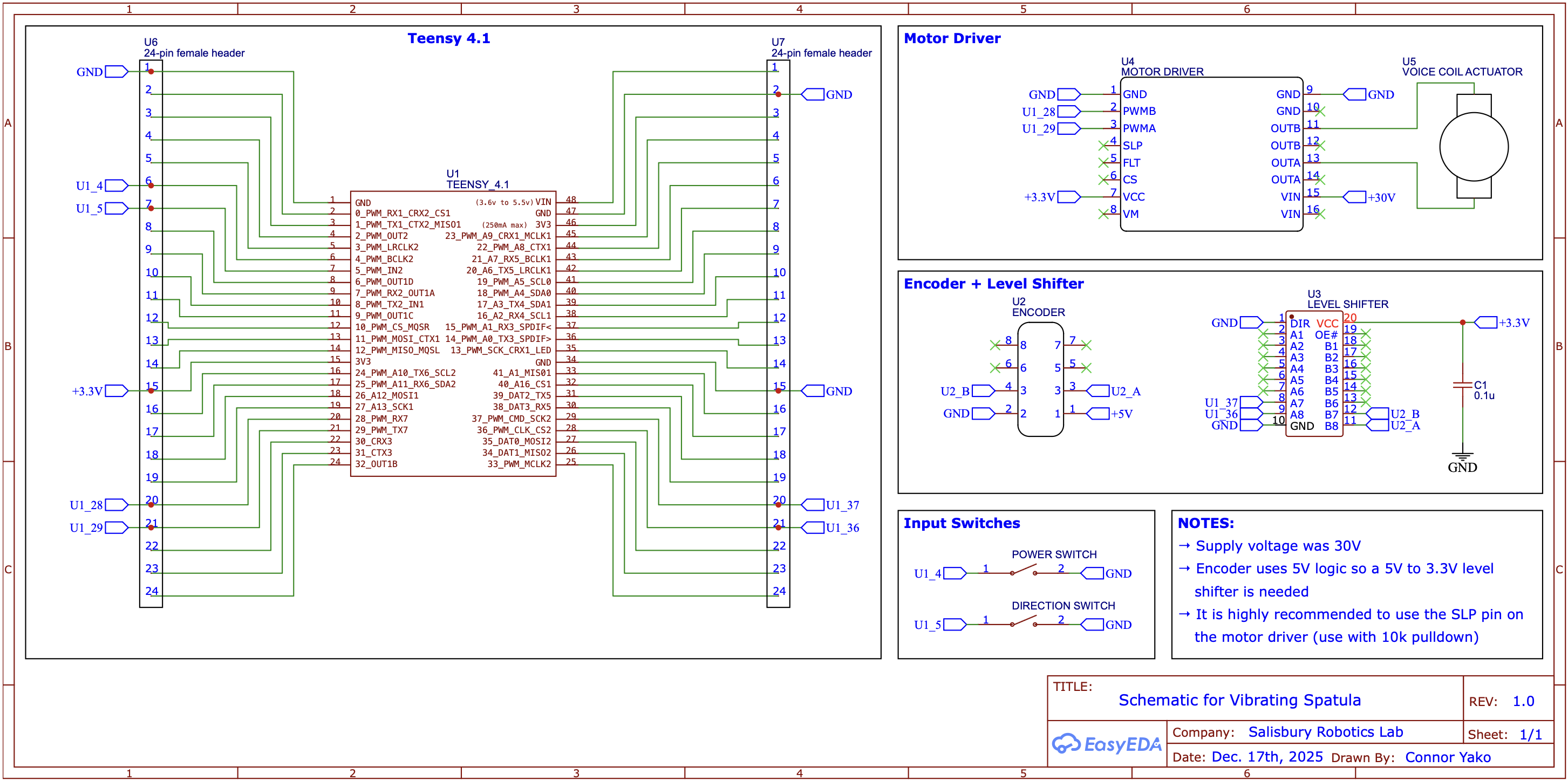
A table of the components used is below.
Electrical Components
| Electrical Component | Quantity | Description |
|---|---|---|
| Teensy 4.1 | 1 | Microcontroller |
| Pololu H2 motor driver | 1 | PWM-based motor driver for powering the VCA |
| Posic linear encoder + scale | 1 | Non-contact encoder (ID1102L) and scale (TPLS04-026) |
| Rocker switch (SPST) | 2 | Controlling device on / off and transport direction |
| Level shifter (SN74LVC245A) | 1 | Shift 5V encoder signal to 3.3V for Teensy |
| Capacitor 0.1u | 1 | Bypass capacitor for the level shifter |
Software
There are two main software components: the Teensy code and the Python code. The Teensy code is for running device. The Python code is used for pre-selecting the waveform parameters with which the moving coil and output surface vibrate, as well as realtime plotting for tuning the PD gains. Everything is available on GitHub.
The high-level function of the Teensy code is to have the moving coil track a user-defined quadratic position waveform, known as the Quaid waveform. The Quaid waveform is specified in the file QuaidWaveformSelector.h, which has the below structure:
// #define FREQ_20_HZ
#define FREQ_30_HZ
// #define FREQ_40_HZ

#if defined(FREQ_20_HZ)
float quaid_frequency = 20;        // Hz
float min_acceleration_gs = 0.25;  // gs
float max_acceleration_gs = 50.0;  // gs

#elif defined(FREQ_30_HZ)
float quaid_frequency = 30; // Hz
float min_acceleration_gs = 2.25;  // gs
float max_acceleration_gs = 50.0;  // gs

#elif defined(FREQ_40_HZ)
float quaid_frequency = 40;        // Hz
float min_acceleration_gs = 3.0;   // gs
float max_acceleration_gs = 50.0;  // gs
Select the desired vibration waveform frequency by uncommenting the corresponding #define at the top of the file, which in the above example is 30 Hz. The rest of the waveform is defined by the two acceleration variables, min_acceleration_gs and max_acceleration_gs. These values can be a bit abstract, so there is a Python helper function, quaid_waveform_visualizer.py, that allows you to visualize the waveform based on the parameters you select. This can help ensure that the tracked waveform amplitude is less than the actuator stroke, as shown below, where the maximum stroke is set to 6 mm.

Once the desired vibration waveform has been selected, the next thing to do is ensure that the moving coil is actually tracking this position waveform. The PD controller gains can be changed by using the controller.set_gains() in void setup() of main.cpp as shown below.
// default kp and kd values shown, but these will differ based on your system
float kp = 4000;
float kd = 6;
controller.set_gains(kp, kd);
Note: the default kp and kd values are quite aggressive, and are needed to track the sharp peaks present in the position waveform when max_acceleration_gs is large (larger leads to faster transport velocities); these values of kp and kd will most likely lead to instability for tracking a single target position, rather than the rapidly changing position waveform in this work.
As part of the control loop, the desired and target positions are sent at 1 kHz to a Python program, realtime_plotter.py. By uploading the code to the Teensy 4.1 (and making sure that #define RUN is uncommented in main.cpp), and then running this Python program the tracking performance of the defined PD controller can be visualized.
First Time Operation
Always try lower gains, lower frequencies, and smaller waveform amplitudes when first starting out with the device. You should also confirm the encoder readings before trying out the controller (see the function encoder.print_position_change() in main.cpp). Also:
 WEAR HEARING PROTECTION!
The device can be loud, especially with more aggressive waveforms (higher max accelerations and larger amplitudes) because of the resonating parts. If you need any help at all getting things up and running please reach out to clyej3@gmail.com and I am more than happy to work with you.
-
Quaid, A. E. (1999, May). A miniature mobile parts feeder: Operating principles and simulation results. In Proceedings 1999 IEEE International Conference on Robotics and Automation (Cat. No. 99CH36288C) (Vol. 3, pp. 2221-2226). IEEE. ↩